Markdownia: a Markdown reader with no browser inside
A Markdown editor and viewer in .NET 10 and Avalonia 12 that draws every heading, table, formula and code block with native controls, then ships as a single Native AOT executable.

Most Markdown apps are a web browser in a trench coat. The editor is a text box, the preview is an embedded Chromium or WebKit view, and the typography is whatever CSS the author wrote that afternoon. It's the sensible design, and it works. I wanted to see what happens if you don't do that.
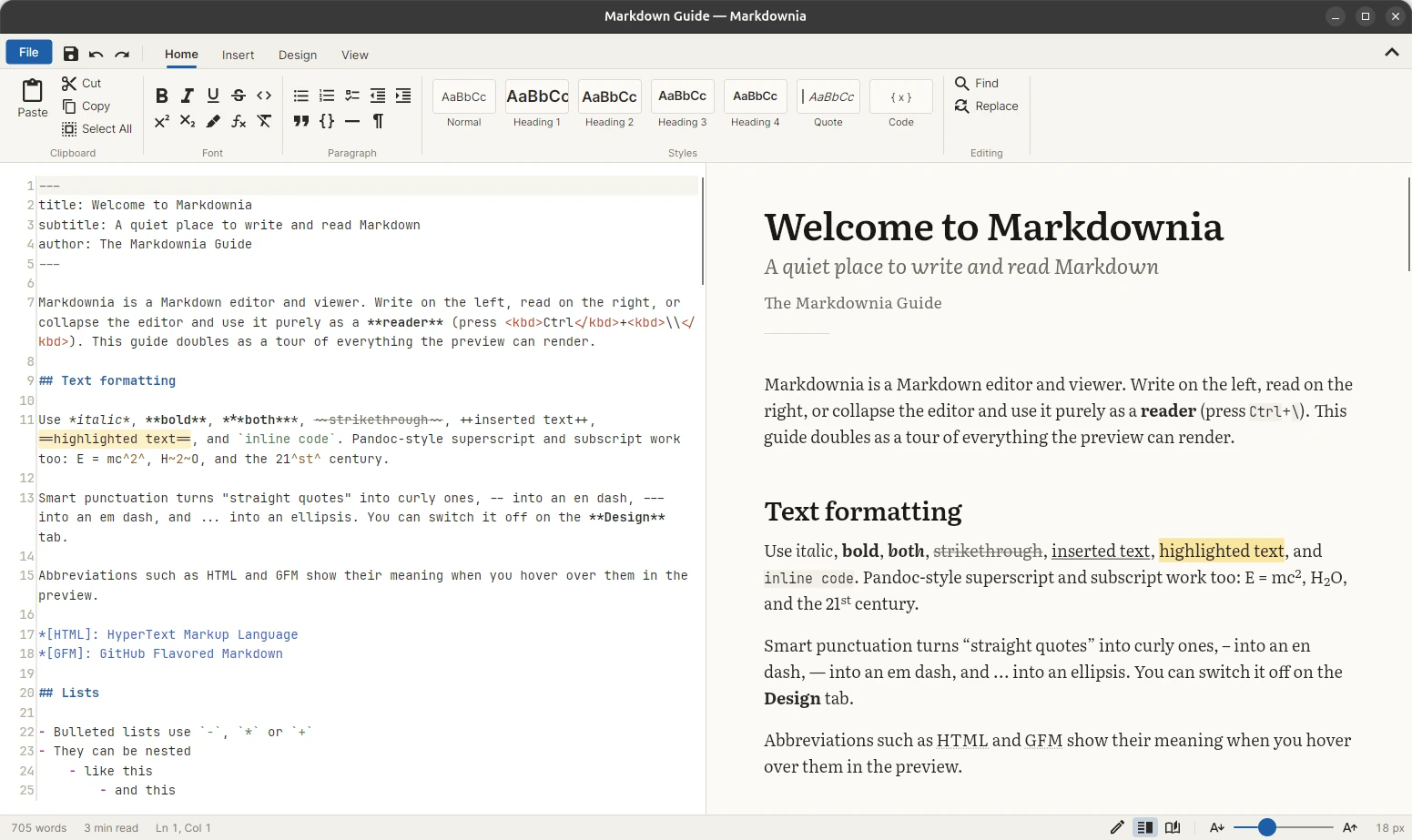
Markdownia (Markdown + Avalonia; the name was too good to pass up) is a Markdown editor and viewer built with .NET 10 and Avalonia 12. You write on the left and read on the right, and Ctrl+\ collapses the editor so it becomes a plain reader. There is no web view anywhere. Every paragraph, table, callout, formula and code block in the preview is a real Avalonia control.
Markdig in, controls out
Parsing is handled by Markdig, which already covers GitHub Flavored Markdown and a good share of Pandoc's extensions. The interesting half is the other one: a renderer that walks Markdig's syntax tree and builds controls instead of HTML. Paragraphs become selectable rich-text blocks. Lists, tables, GitHub alerts, Pandoc fenced divs, figures and footnotes become composed layout panels. Math is typeset natively by CSharpMath in Latin Modern Math, and inline formulas report their baseline, so $ax^2$ sits on the line with the words around it instead of floating above them.
Parsing runs on a background thread and each render is tagged with a version number, so a burst of typing only ever paints the latest text. And if the renderer throws, the exception appears in place of the preview instead of taking down the editor and your unsaved document with it.
Typography is the point
The whole reason to skip the browser is control over how text looks. Markdownia bundles Literata, Source Serif 4, Atkinson Hyperlegible, Inter and JetBrains Mono, keeps lines to a readable measure (narrow, medium, wide or full), and offers Smooth, Sharp or Subpixel text rendering. Smart punctuation turns straight quotes into curly ones and -- into dashes. Code fonts have their ligatures turned off, because => should look like the two characters you typed.
The detail I'm proudest of is line height. Every line height is rounded to a whole pixel and the preview snaps baselines to the pixel grid, so text stays crisp instead of smearing across two rows of pixels. That exposed a quirk. When a heading's line height is tighter than the font's ascent plus descent, Avalonia keeps the baseline at the full ascent and lets the descenders hang out of the bottom of the control. The fix borrows CSS's idea of half-leading:
// When the line height is smaller than the font's ascent + descent (headings, titles), Avalonia keeps the
// baseline at the full ascent and the descenders hang below the control. Center the glyphs in the line box
// instead, like CSS half-leading.
var overflow = _glyphExtent * fontSize - lineHeight;
if (overflow > 1)
    text.RenderTransform = new TranslateTransform(0, -Math.Round(overflow / 2));
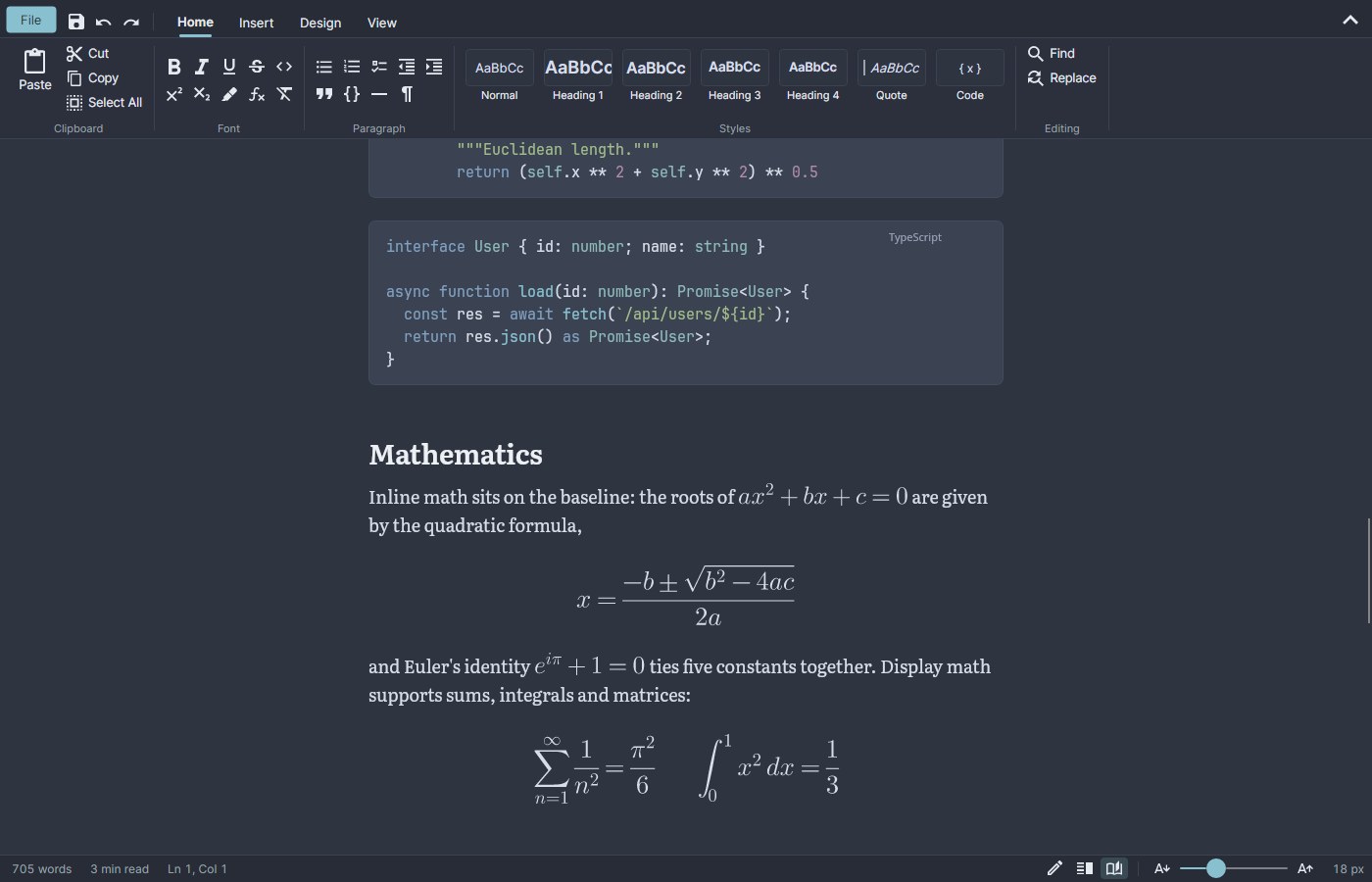
There are nine themes: Paper, GitHub Light, Sepia and Solarized Light, plus GitHub Dark, Nord, One Dark, Solarized Dark and Dracula. Each one colors the window chrome, the editor, the preview and the code together, so switching themes repaints the whole room, not just the page.
A ribbon, unironically
The toolbar is a Word-style ribbon with Home, Insert, Design and View tabs, a Styles gallery, a hover-grid table picker and a theme gallery. A ribbon is an odd choice for Markdown, a format that exists so you don't need a toolbar. But Markdown has picked up a lot of syntax nobody remembers: footnotes, definition lists, {width=50%} attributes, *[HTML]: abbreviations, ::: warning blocks. A ribbon is a good place to discover it. Every button writes ordinary Markdown into the editor, and the file stays yours.
Two editing features turned out to be more fun than I expected.
Images resize in the preview. Hover over an image, drag the handle in its corner, and the new width is written back to the Markdown as {width=480} (or as a width attribute on an <img> tag). Writing from the preview back into the source can corrupt a document if the source has changed in the meantime, so each resize request carries the exact text it was rendered from and is dropped if that text no longer matches:
// Ignore the request if the text has changed since this preview was rendered.
if (resize.End > doc.TextLength || doc.GetText(resize.Start, resize.End - resize.Start) != resize.Original)
    return;
Scroll sync without the feedback loop. Synchronized panes have a classic bug: the editor scrolls the preview, which scrolls the editor, which scrolls the preview. Markdownia tracks a leader instead. Whichever pane you last pointed at, clicked, scrolled or typed in is in charge, and the other one only follows.
// Scroll sync follows whichever pane the user is working in, so the panes never drive each other in a loop.
void Lead(Control pane, ScrollLeader leader)
{
    pane.AddHandler(PointerEnteredEvent, (_, _) => _scrollLeader = leader, handledEventsToo: true);
    pane.AddHandler(PointerPressedEvent, (_, _) => _scrollLeader = leader, RoutingStrategies.Tunnel, handledEventsToo: true);
    pane.AddHandler(PointerWheelChangedEvent, (_, _) => _scrollLeader = leader, RoutingStrategies.Tunnel, handledEventsToo: true);
    pane.AddHandler(KeyDownEvent, (_, _) => _scrollLeader = leader, RoutingStrategies.Tunnel, handledEventsToo: true);
}
One native executable
Like webshare, Markdownia publishes with Native AOT, and that shaped a lot of decisions: compiled XAML bindings, source-generated JSON and regexes, editor highlighting rules built in code instead of loaded from XSHD files, and no reflection-based view location. Syntax highlighting for the preview's code blocks comes from a small hand-written tokenizer that covers about 25 languages, from C# and Rust to Dockerfile and Lua. It's deliberately approximate: pleasant, readable coloring with no regex engine, grammar files or reflection. dotnet publish finishes with zero trim or AOT warnings.
The result is a single Markdownia executable of about 36 MB, fonts included, with the Skia and HarfBuzz native libraries next to it. It starts like a native app because it is one.
Two helpers make a GUI app easier to check without clicking around:
Markdownia --smoke-test out.pngrenders the main window and the full preview offscreen, saves both as PNGs, and exits with status 0 if everything worked. It's a quick way to confirm an AOT build really runs.tools/Snapshotrenders the real window headlessly in any theme, layout or scroll position. The Nord screenshot above came from it.
On Linux, packaging/linux/build-deb.sh builds a .deb that installs a markdownia command, a desktop entry and icons, and registers Markdownia for text/markdown, so it shows up under “Open With” for .md files. It needs glibc 2.38 or newer (Ubuntu 24.04, Debian 13 or later).
What it doesn't do (yet)
- SVG images aren't rendered; you get their alt text.
- Raw HTML blocks are reduced to their text and images, though common inline tags like
<kbd>,<sup>and<mark>work. - Pandoc features Markdig doesn't implement (inline notes, citations, line blocks, example lists) aren't available.
- You can select text within one paragraph, list item or code block at a time, but not across several. This is the real price of skipping the browser: a web view gives you document-wide selection for free, and a stack of native controls doesn't.
Try it
Version 1.0.0 is on the releases page as a .deb and a Linux x64 zip. To build it yourself you need the .NET 10 SDK:
git clone https://github.com/dotericr/Markdownia
cd Markdownia
dotnet run --project src/Markdownia -- README.md
It's MIT licensed, and the code is on GitHub. Point it at a README you've read a hundred times and see how it looks with real typography.